JSON Formatter Online: Validate, Pretty Print and Minify
Learn to validate, format and minify JSON online with real examples, indentation options and clear syntax-error checks using Sikelia Tools in your browser.
JSON Formatter
Validate, pretty-print with two or four spaces, and minify JSON without sending input for server processing.
Open JSON FormatterA long string of JSON is difficult to scan when every key, value and bracket sits on one line. A JSON formatter online turns a valid JSON document into a readable structure with indentation. The same utility can check whether your input parses as JSON and, if needed, remove unnecessary formatting whitespace.
The Sikelia Tools JSON Formatter combines validation, Pretty Print and Minify in one browser-based tool. It offers two- and four-space indentation, a sample you can load into the editor, and a result panel you can copy. The text is processed locally in your browser; no account is required.
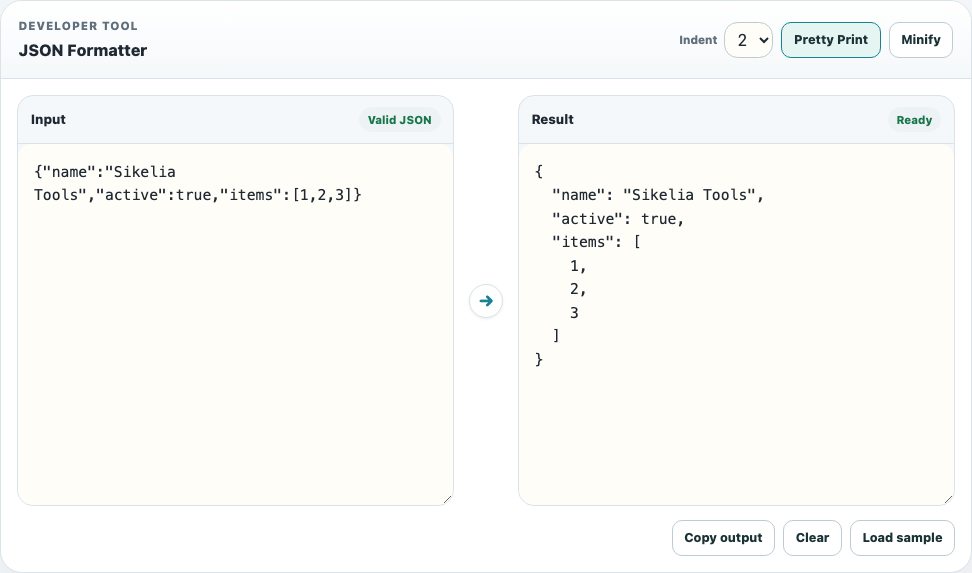
Format JSON step by step
- Open the JSON Formatter using the tool link or the button on this guide.
- Paste a JSON object or array into the Input field, or load the example from the interface.
- Check the validation status. Valid JSON means the document is syntactically acceptable to the parser; it does not prove that the data matches a particular application schema.
- Choose 2 or 4 in the indentation selector, then select Pretty Print.
- Review the indented content in Result and use Copy output if you need it in an editor, ticket or configuration file.
For a compact version, use Minify instead. The tool removes formatting whitespace that is not needed to represent the same parsed JSON value.
Example: make a compact object readable
Paste this intentionally compact but valid JSON:
{"name":"Sikelia Tools","active":true,"items":[1,2,3]}With the two-space option, the formatted result is:
{
  "name": "Sikelia Tools",
  "active": true,
  "items": [
    1,
    2,
    3
  ]
}
Pretty printing does not rename the keys or change the values. It makes the object structure easier to read, review and compare. Indentation with four spaces will display the same content more widely.
Fix common JSON syntax errors
A frequently encountered mistake is to leave a comma after the final property:
{"name":"Sikelia Tools",}That is not valid JSON. JSON does not permit a trailing comma after the final property or array item. Other common problems include single quotes instead of double quotes around keys, missing commas between properties, and missing closing brackets.
The formatter reports invalid input and may show an approximate line and column. Correct the source first; formatting and minification controls are intentionally unavailable while the document is invalid. The tool does not silently repair your data.
When should you use Pretty Print or Minify?
Pretty Print is best for reviewing API examples, inspecting exported configuration, understanding nested arrays and discussing a payload with a teammate. It can make differences easier to spot during a manual review.
Minify is useful when you want the same JSON data represented without decorative indentation or line breaks. But small test files do not need minification for performance, and minifying does not encrypt or protect information.
Both operations assume valid JSON. Syntax validation cannot determine whether an API expects a different field name, whether a timestamp makes sense, or whether a value is appropriate for your business rules.
Privacy, limitations and the next step
JSON files can contain credentials, tokens and personal data. Prefer examples containing non-sensitive test values, and do not paste secrets into an unfamiliar service. Sikelia’s formatter performs this transformation in the browser, but you should still follow your organization’s data-handling policy.
If you need to turn CSV or YAML into JSON rather than simply format an existing JSON document, start with the CSV-to-JSON conversion guide and its separate CSV / JSON / YAML Converter. If the goal is to check syntax, indent or minify an existing JSON document, go directly to the free online JSON Formatter and try the sample above.
JSON Formatter
Validate, pretty-print with two or four spaces, and minify JSON without sending input for server processing.
Open JSON Formatter